Create a resource model in Magento
Learn how to create a Magento resource model to link a Post model to the macademy_blog_post database table.
Lesson Content
We probably want our model linked to a table in the database. This is done by creating what’s called a resource model. Resource models are what relate a model to its related database table.
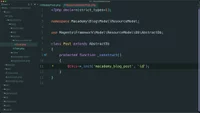
Let’s create a new folder under Model named ResourceModel, and under that we will create a new PHP file with the name of our resource model, which will also be Post.
This will be similar to our model. Let’s open up our PHP tag, declare strict types, and set our namespace to Macademy\Blog\Model\ResourceModel.
Next we will create our Post class, and this will extend AbstractDb from `Magen...

Join the discussion!
Comments
Want to comment on this lesson?
Enroll in this course to leave comments.