Deploy to environments with git branches in Adobe Commerce Cloud
In Adobe Commerce Cloud, deploy code to environments by merging Git branches such as integration, staging, master, and production.
Lesson Content
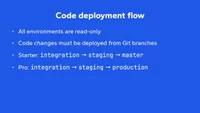
Since all environments within Adobe Commerce Cloud are read-only, all code changes must be deployed from Git branches. Code changes originate from an integration branch, get merged into the staging branch, and then finally merged into either the master branch (on Starter plans) or the production branch (on Pro plans).
Starter: integration -> staging -> master
Pro: integration -> staging -> production
Starter plan
Branches directly mirror the environment on Starter plans:
Integration environment(s):
integrationbranchStaging environment:
staging...

Join the discussion!
Comments
Want to comment on this lesson?
Enroll in this course to leave comments.