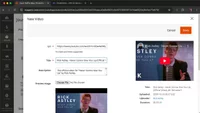
Embed Vimeo or YouTube video URLs within product pages in Magento
Magento 2 lets you easily embed Vimeo or YouTube videos on product pages by using built-in video support and YouTube API integration.
Lesson Content
Magento 2 supports adding videos from Vimeo to your products right out of the box. No need for custom modules or extensions are needed!
Adding a video to a product is straightforward:
Go to Catalog > Products
Edit a product
Scroll to the Images and Videos section
Click Add Video
Enter the URL of the video from Vimeo
Magento is designed to embed videos from platforms like Vimeo and YouTube, so you do not need to host them directly yourself.
...
Join the discussion!
Comments
Want to comment on this lesson?
Enroll in this course to leave comments.