Override a class using a preference in Magento
Learn how to override a Magento class using di.xml class preference and disable plugins.
Lesson Content
Sometimes you wish to completely override a Magento class. This can be done using a class preference. This is useful if you can’t use a plugin, for example when the function you want to change is private or protected, or when you have many changes that would make plugins hard to follow.
Let’s say we want to prevent the event property from ever being created in the first place. We can do this by completely overriding the controller with our own class.
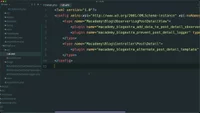
First disable the prevent post detail logger plugin. Do this by adding a disabled attribute equal to true on the plugin node.
Here...

Join the discussion!
Comments
Want to comment on this lesson?
Enroll in this course to leave comments.