Understand directory and filesystem of Adobe Commerce Cloud
Learn Adobe Commerce Cloud filesystem rules, writable directories, and best practices to avoid permission errors in production.
Lesson Content
When you deploy to Adobe Commerce Cloud, the platform locks down your filesystem. This security feature catches many developers by surprise, as code that worked perfectly locally can suddenly throw permission errors in production.
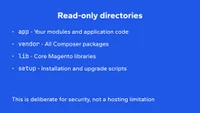
In production, you can only write to specific directories. Everything else is read-only. This is also known as an ephemeral filesystem design.
These directories accept writes:
var- Cache, logs, temporary files, and generated codepub/static- Generated CSS and JavaScript <...

Join the discussion!
Comments
Want to comment on this lesson?
Enroll in this course to leave comments.