Debug and fix simple errors in Claude Code
Debug and fix simple errors in Claude Code using error messages, logs, stack traces, and ultrathink mode.
Lesson Content
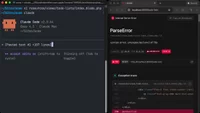
You don't need a fancy prompt to have Claude Code fix bugs. You can just paste in the error message, and Claude Code is smart enough to figure out what to do.
That said, a little context goes a long way. Sometimes the error message alone isn't enough for Claude to pinpoint the issue.
Interrupting the AI when errors occur
In my Laravel app, I have Vite installed which automatically reloads the site as changes are happening. Claude Code will occasionally write something that contains a bug — like referencing a variable that wasn't created yet, or forgetting to close a bracket on an i...

Join the discussion!
Comments
Want to comment on this lesson?
Enroll in this course to leave comments.