Resume or continue a coding session in Claude Code
Resume and continue Claude Code sessions using resume, search, and continue commands after crashes.
Lesson Content
What happens when you are in the middle of a giant coding session, and your computer crashes or loses power? You might think you're out of luck, but Claude Code has a command that allows you to pick up right where you left off.
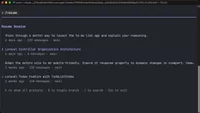
After starting Claude Code, type /resume. This will show you a list of previous coding sessions, and you can use your up and down arrows to pick a specific session to resume.
When in the Resume Session menu, you can also type / to search all previous conversations for a specific keyword. This lets you quickly find a previous session without scrolling through every...

Join the discussion!
Comments
Want to comment on this lesson?
Enroll in this course to leave comments.