
When a Magento 2 product collection is missing products, something added a WHERE or JOIN you didn't expect. The usual suspects are the stock-status filter (out-of-stock products hidden), status or visibility filters, website assignment, or a third-party plugin on the collection. Load the collection, print (string) $collection->getSelect(), and the culprit is in the SQL.
A product collection that drops products never throws an error. The SQL just has a WHERE clause you didn't write.
Identifying the problem
Let's say you need to pull a specific set of products by SKU. You write what seems like perfectly good code, hit run, and... wait, where did half the products go?
Here's an example based on one I ran into on a client project (I changed the SKUs to products from sample data so you can follow along if you wish):
use Magento\Catalog\Model\ResourceModel\Product\CollectionFactory as ProductCollectionFactory;
public function __construct(
private readonly ProductCollectionFactory $productCollectionFactory,
) {
}
public function someFunction(): void
{
$skuArray = ['24-MB01', '24-MB02', '24-MB03'];
$productCollection = $this->productCollectionFactory->create()
->addFieldToFilter('sku', ['in' => $skuArray]);
foreach ($productCollection as $product) {
dump($product->getData('sku'));
}
}Simple enough, right? You'd expect all three products, and say one of those three bags is out of stock. Run it from a CLI command and you get all three. Run the exact same code from a frontend block, and only two show up.
You check the database, and yep, all three products are there. Magento isn't throwing exceptions or filling your logs with warnings. It's just silently excluding a product.
Print the SQL first
The first thing I do is look at the SQL the collection actually runs:
$productCollection->load();
echo (string) $productCollection->getSelect();Call load() first, and don't skip it. Several modules add their joins and filters to a product collection while it loads (as a beforeLoad plugin), so printing the select before loading hides exactly the part you're looking for.
From the CLI, our collection prints this:
SELECT `e`.* FROM `catalog_product_entity` AS `e` WHERE (`e`.`sku` IN('24-MB01', '24-MB02', '24-MB03'))Nothing in there would drop a product. Now the same code on the frontend prints something like this:
SELECT `e`.*, `stock_status_index`.`stock_status` AS `is_salable` FROM `catalog_product_entity` AS `e`
INNER JOIN `cataloginventory_stock_status` AS `stock_status_index` ON e.entity_id = stock_status_index.product_id
WHERE (`e`.`sku` IN('24-MB01', '24-MB02', '24-MB03')) AND (stock_status_index.stock_status = 1)There's the culprit. In the frontend area, Magento\CatalogInventory\Model\AddStockStatusToCollection is a beforeLoad plugin on the product collection. When Stores > Configuration > Catalog > Inventory > Stock Options > Display Out of Stock Products is set to "No" (the default), it adds that inner join and stock_status = 1, so out-of-stock products disappear, including our out-of-stock bag. (The exact join varies with your inventory setup, but the stock_status = 1 condition is the tell.)
Copy the printed query into your MySQL client and remove conditions one at a time until the missing product comes back. Every cause on this list shows up as a WHERE clause or a JOIN.
Common causes
Why are out-of-stock products missing from my collection?
That's the stock-status filter above. Either turn on "Display Out of Stock Products" (the cataloginventory/options/show_out_of_stock config path), or, if only this one collection should include them, tell the stock helper the filter is already handled. Do this before the collection loads:
$productCollection->setFlag('has_stock_status_filter', true);That looks backwards, but it's how core does it. Magento\CatalogInventory\Helper\Stock::addIsInStockFilterToCollection() only adds the stock join when the collection doesn't have that flag, and then sets it to true itself. Setting it yourself first means "already done, skip it". (hasFlag() only checks that the key exists, so false would also skip it by accident. Use true so the intent matches the code.)
Why does setStoreId() not change the results?
Store IDs trip people up because the constant names are misleading. Store::DEFAULT_STORE_ID is 0, which is the admin store (default values), not the default store view. The default store view in a stock install is Store::DISTRO_STORE_ID, which is 1.
Attribute values are scoped, so a product can be enabled or named differently per store view. If you're debugging what the storefront sees, set the store ID of the actual store view:
use Magento\Store\Model\StoreManagerInterface;
// $this->storeManager is an injected StoreManagerInterface
$productCollection->setStoreId((int) $this->storeManager->getStore()->getId());Status and visibility filters
A raw CollectionFactory::create() collection does not filter by status or visibility on its own. If disabled or not-visible products are missing, that's because you, or a module, added a filter for them. Look for it in the SQL.
Don't call setVisibility(null) to "turn visibility off". With store ID 0 it calls addAttributeToFilter('visibility', null), which adds a filter instead of removing one. If you don't want a visibility filter, just don't add one.
When you do want only enabled products, add the filter explicitly:
use Magento\Catalog\Model\Product\Attribute\Source\Status;
$productCollection->addAttributeToFilter('status', ['eq' => Status::STATUS_ENABLED]);Website assignment
Products that aren't assigned to the current website disappear from storefront collections. If you (or a module) called addWebsiteFilter() or addStoreFilter(), check the product's "Product in Websites" setting in the admin.
Third-party plugins on the collection
Third-party modules love to add their own filters to product collections. Before you start disabling modules one at a time, list every plugin on the collection:
bin/magento dev:di:info "Magento\Catalog\Model\ResourceModel\Product\Collection"That shows every plugin and its before/after/around methods, so you can go straight to the suspicious ones. Here's how to read the dev:di:info output. Only then, if you still need to, disable a module to confirm:
bin/magento module:disable Vendor_SuspiciousModuleRe-enable it if it wasn't the culprit.
Out-of-date indexes
If your indexes are behind, collections that read from index tables (like the stock status index above) can be working from stale data. Reindex and try again:
bin/magento indexer:reindexMore ways to debug the collection
Log the query
Sometimes you need to see the query outside the browser, especially on an environment you can't attach a debugger to. Log it:
use Psr\Log\LoggerInterface;
public function __construct(
private readonly LoggerInterface $logger,
) {
}
public function anotherFunction(): void
{
// ...build $productCollection here...
$productCollection->load();
$this->logger->info('SQL Query: ' . (string) $productCollection->getSelect());
$this->logger->info('Product Count: ' . $productCollection->count());
foreach ($productCollection as $product) {
$this->logger->info('Product loaded: ' . $product->getSku());
}
}This writes to the log without exposing the query on the frontend. info() lands in var/log/system.log, so watch it with tail -f var/log/system.log. (Use count() here rather than getSize(): getSize() runs a separate COUNT query, while count() counts the items that actually loaded.) If you'd rather see the values in a desktop app, Spatie Ray works well for this too.
Bypass the collection
If you're stumped, go straight to the source and load each product with the repository:
use Magento\Catalog\Api\ProductRepositoryInterface;
use Magento\Framework\Exception\NoSuchEntityException;
public function __construct(
private readonly ProductRepositoryInterface $productRepository,
) {
}
public function customFunction(array $skuArray): void
{
foreach ($skuArray as $sku) {
try {
$product = $this->productRepository->get($sku);
echo "Found product: " . $product->getName() . "\n";
} catch (NoSuchEntityException $e) {
echo "Product not found: " . $sku . "\n";
}
}
}If the repository finds a product the collection doesn't, the problem is a filter on the collection, not the product.
Enable the query log
To log every SQL query Magento runs, enable the query log:
bin/magento dev:query-log:enable
bin/magento cache:flushQueries are written to var/debug/db.log (note it's var/debug, not var/log). Run bin/magento dev:query-log:disable when you're done, because it grows fast.
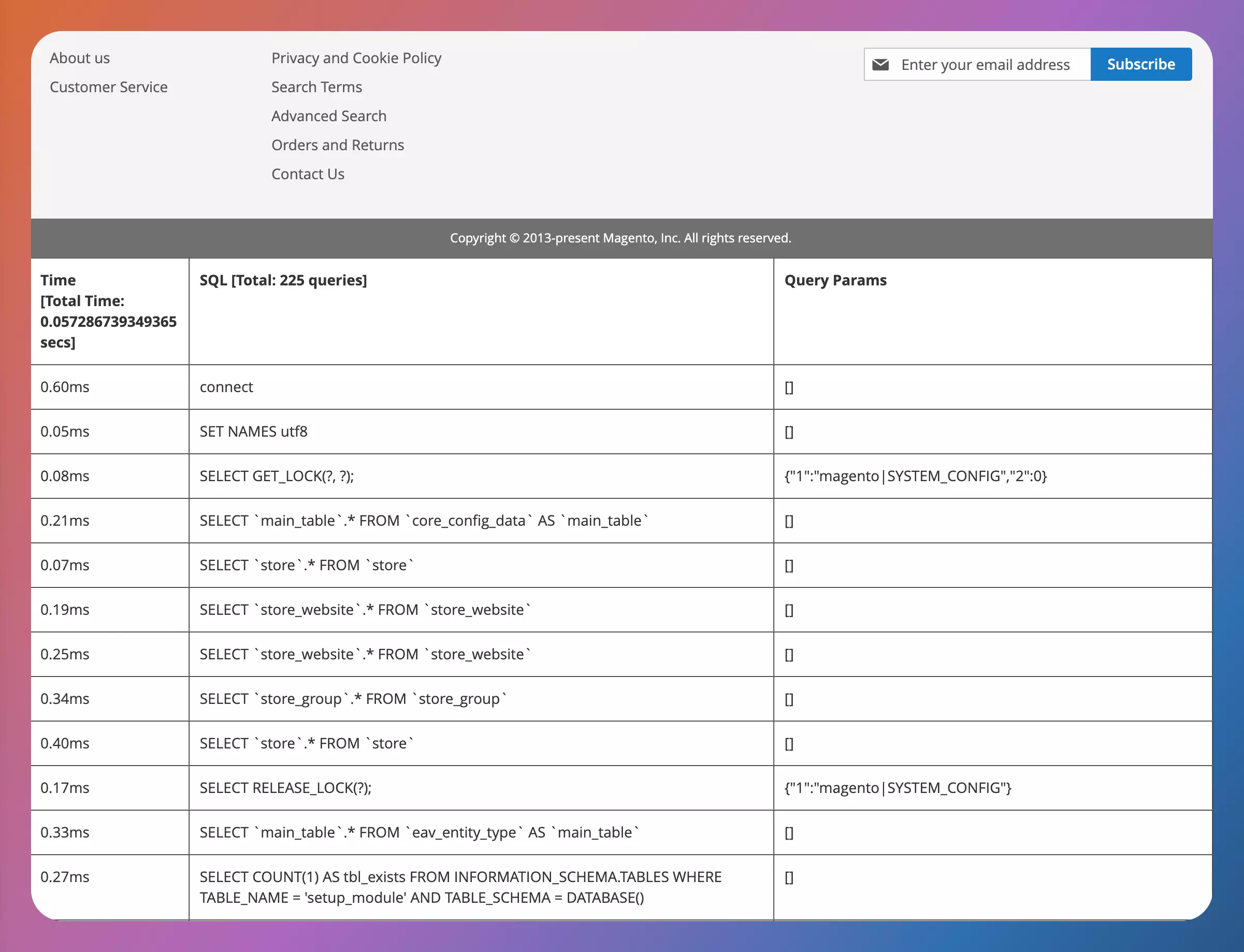
Enable the database profiler
If you want the queries for a single frontend request on screen, you can enable the profiler in app/etc/env.php:
'db' => [
'connection' => [
'default' => [
// ...
'profiler' => [
'class' => '\Magento\Framework\DB\Profiler',
'enabled' => true,
],
],
],
],Then temporarily add this to the end of pub/index.php, after $bootstrap->run($app);. This is a local debugging hack. Never commit or deploy it.
/** @var \Magento\Framework\App\ResourceConnection $res */
$res = \Magento\Framework\App\ObjectManager::getInstance()->get(\Magento\Framework\App\ResourceConnection::class);
/** @var \Magento\Framework\DB\Profiler $profiler */
$profiler = $res->getConnection()->getProfiler();
echo "<table cellpadding='0' cellspacing='0' border='1'>";
echo "<tr>";
echo "<th>Time <br/>[Total Time: " . $profiler->getTotalElapsedSecs() . " secs]</th>";
echo "<th>SQL [Total: " . $profiler->getTotalNumQueries() . " queries]</th>";
echo "<th>Query Params</th>";
echo "</tr>";
foreach ($profiler->getQueryProfiles() as $query) {
echo '<tr>';
echo '<td>', number_format(1000 * $query->getElapsedSecs(), 2), 'ms', '</td>';
echo '<td>', $query->getQuery(), '</td>';
echo '<td>', json_encode($query->getQueryParams()), '</td>';
echo '</tr>';
}
echo "</table>";If you're using docker-magento, the
pubdirectory isn't mounted from your host for performance reasons, so drop into the container withbin/bashand editpub/index.phpthere.
The table lists every query from that request:
A note on addAttributeToSelect('*')
This one doesn't make products disappear, but it does make attribute values look missing. A collection only loads the attributes you ask for, so $product->getName() can come back null on a product that clearly has a name. Select what you need:
$productCollection->addAttributeToSelect(['name', 'price']);addAttributeToSelect('*') works too, but it joins every attribute, which gets slow on large catalogs.
And yes, when all else fails, bin/magento cache:flush. It's the "turn it off and on again" of the Magento world, and it fixes things a bizarrely non-trivial amount of the time.
Print the SQL first. Every cause above shows up there as a WHERE clause or a JOIN, and once you can see it, the fix is usually one line. If your collection returns nothing rather than fewer products, check whether you're reusing one collection for two queries: this article on using multiple collections in Magento 2 explains why that ANDs your filters together.