Organize CLAUDE.md files in Claude Code
Learn where CLAUDE.md files live, how instructions stack, load, and organize project rules with nested directories.
Lesson Content
A CLAUDE.md file can live in a number of different locations, and each one has a different scope:
- The project root (
./CLAUDE.mdor./.claude/CLAUDE.md) -- the main instructions for the current project, shared with your team through version control - Any parent directory -- useful if you manage a monorepo containing multiple projects
- Any child directory -- which lets you add more detailed context within specific corners of your project
- Your home folder (
~/.claude/CLAUDE.md) -- personal preferences that apply to ALL of the projects on your machine
There's also CLAUDE.local.md, which sits alongside your project file for personal notes you don't want to commit. Add it to your .gitignore.
These files stack
The important thing to understand is that these files all stack. A nested CLAUDE.md does not replace or override the one above it. You end up with the combined instructions from every file in play, not just the closest one. If your home folder file says to always write tests and your project file says to use PHPUnit, you get both.
They're loaded broadest scope first, working down toward your working directory, so the most specific instructions land closest to your conversation.
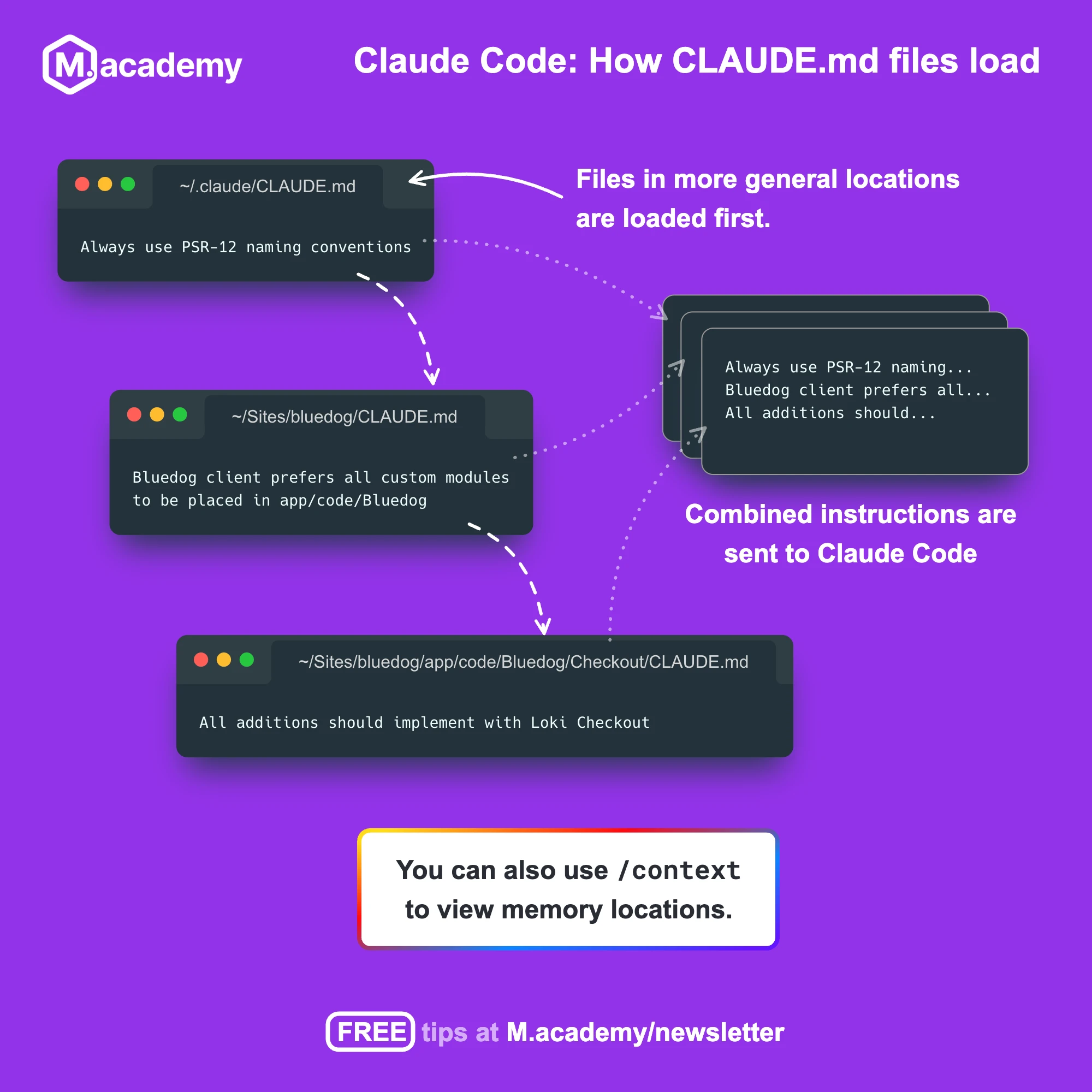
When they load differs a bit, though. Claude Code walks up the directory tree from wherever you started it, and every CLAUDE.md it finds on the way up gets loaded in full right at launch. Files that sit in subdirectories below you work differently -- those only get loaded when Claude actually reads a file in that directory.
That second part is what makes pushing detail down into subdirectories such a good deal. Rules that only matter inside one corner of your codebase cost you nothing until Claude goes and works in that corner. So if a set of rules applies to only one part of a project, put a CLAUDE.md in that directory rather than growing the one at the root. That's exactly how the nested structure is meant to work.
Check what actually loaded
To see which files Claude Code pulled into context, run the /context slash command and look at the list under Memory files. If a file you expected isn't there, Claude can't see it, and that's usually the answer to "why is it ignoring my instructions?"
You can also run /memory to browse and open your memory files for editing without leaving your session.
Note: You can tell Claude to remember something as you're working, but be aware of where it goes. By default that gets saved to auto memory, which is a separate system from your
CLAUDE.mdfiles. If you want it inCLAUDE.mdspecifically, say so -- "add this to CLAUDE.md." Personally, I prefer to landscape these files manually to keep things organized.
Commit the project file
Your home folder file is personal and stays on your machine. The project file is different -- it's meant to be shared, so commit it and push it upstream to keep everyone on the same page:
git add CLAUDE.md
git commit -m "Add CLAUDE.md file"
git push
Join the discussion!
Comments
Want to comment on this lesson?
Log in to leave comments.