
Plugin sort order looks like a simple ascending list. Add one around plugin and it isn't: everything after it runs inside its $proceed().
Magento runs before plugins in ascending sortOrder, then the first around plugin. When that around plugin calls $proceed(), every remaining plugin (befores, arounds, afters) runs inside it, then the original method. After plugins for the outer plugins run last, also in ascending order. One around plugin turns a flat list into nested calls.
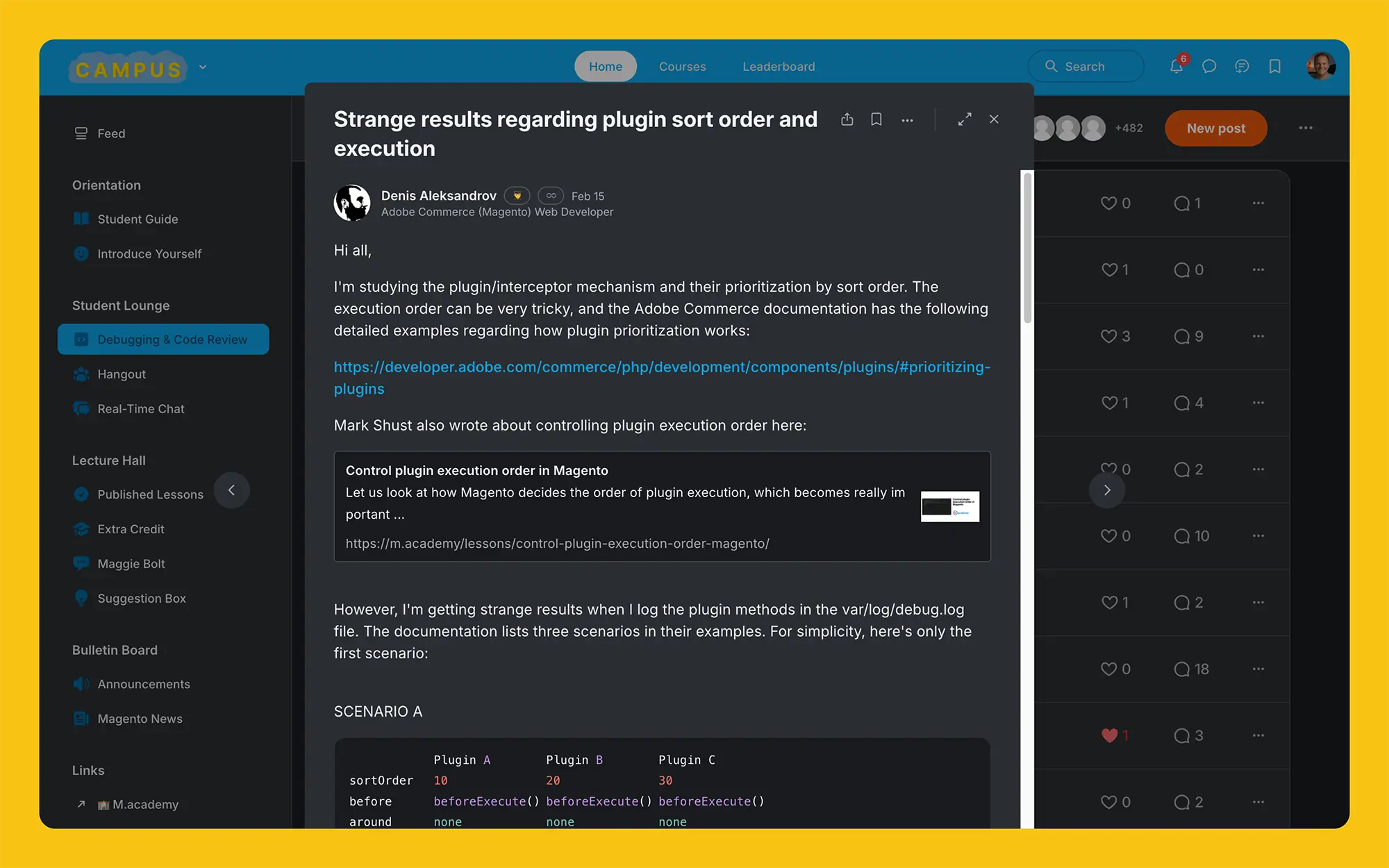
The question started on Campus
A question popped up on Campus, the community for Magento developers that's included in the University.
Denis, one of our University students, asked specifically about how plugin sort order and execution works, which kicked off this little deep-dive:
On a side note, I love diving into these questions that send you down a bit of a rabbit hole. This makes your brain really think, and when you document your findings, you can truly learn how something works. It's one of the reasons I love Campus so much.
Magento Plugins: The Basics
Quick refresher: before plugins change a method's arguments, after plugins change its return value, and around plugins wrap the call and decide whether the original method runs at all. If you're deciding between a plugin and an observer in the first place, start here.
Plugins on the same method are prioritized with the sortOrder attribute in the di.xml file they're declared in. This lets you control the order in which plugins execute. The order is determined by sortOrder alone, not by the plugin's name or class. For ties, it falls back to the order the di.xml files were merged, which follows module load order (<sequence> in module.xml). One gotcha: a plugin with no sortOrder at all gets 0 (the DI config mapper fills it in), so it runs before every plugin with a positive sort order.
Now let's determine what happens when you have multiple plugins which target the same method.
According to Adobe's documentation, when you have multiple plugins (let's call them A, B, and C) each with a different sort order, they execute like this:
Plugin A (sort order 10): beforeExecute()
Plugin B (sort order 20): beforeExecute()
Plugin C (sort order 30): beforeExecute()
Original method execution
Plugin A (sort order 10): afterExecute()
Plugin B (sort order 20): afterExecute()
Plugin C (sort order 30): afterExecute()This makes sense -- but what happens when an around plugin is thrown into the mix?
This is where things get interesting.
Three rules that explain Magento plugin execution order
After a lot of testing, I've found that Magento's plugin execution follows these three rules, in order of importance:
-
Lower sort order = higher priority
This determines which plugin gets executed first. If two plugins target the same method, the one with the lower sort order runs first. There can even be negative sort orders, which execute before positive sort orders!
-
Within one plugin's turn: before, then around, then after
The type of plugin also determines the execution order. When it's a plugin's turn, its before method runs first, then its around method, then its after method. This is of course why before plugins are called "before" and after plugins are called "after". Rule 3 is what breaks the "one flat list" mental model.
-
Around methods create a nested execution context for all remaining plugins
This rule is the most surprising! Around plugins throw a wrench in the mix, and most developers don't realize how its sequencing works.
The third rule is the one that matters.
Around Plugins restart execution loops
When an around plugin executes, it doesn't just wrap around the original method -- it actually starts an entirely new execution sequence for all remaining plugins.
Let's look at an example so you can see what I mean. I created a simple module with three plugins.
They are named A, B, and C, each with a related and corresponding sortOrder:
<?xml version="1.0"?>
<config xmlns:xsi="http://www.w3.org/2001/XMLSchema-instance" xsi:noNamespaceSchemaLocation="urn:magento:framework:ObjectManager/etc/config.xsd">
<type name="Magento\Cms\Controller\Index\Index">
<plugin name="vendor_module_a" type="Vendor\Module\Plugin\A" sortOrder="10"/>
<plugin name="vendor_module_b" type="Vendor\Module\Plugin\B" sortOrder="20"/>
<plugin name="vendor_module_c" type="Vendor\Module\Plugin\C" sortOrder="30"/>
</type>
</config><?php
declare(strict_types=1);
namespace Vendor\Module\Plugin;
class A
{
public function beforeExecute()
{
dump(__METHOD__);
}
public function afterExecute($subject, $result)
{
dump(__METHOD__);
return $result;
}
}<?php
declare(strict_types=1);
namespace Vendor\Module\Plugin;
class B
{
public function beforeExecute()
{
dump(__METHOD__);
}
public function aroundExecute(
$subject,
callable $proceed
) {
dump(__METHOD__ . ' before');
$result = $proceed();
dump(__METHOD__ . ' proceed');
dump(__METHOD__ . ' after');
return $result;
}
public function afterExecute($subject, $result)
{
dump(__METHOD__);
return $result;
}
}<?php
declare(strict_types=1);
namespace Vendor\Module\Plugin;
class C
{
public function beforeExecute()
{
dump(__METHOD__);
}
public function afterExecute($subject, $result)
{
dump(__METHOD__);
return $result;
}
}There's nothing magical going on here -- Plugins A and C each have a before and an after method, and Plugin B has all three: before, around and after.
Two notes before we look at the output. Every after plugin takes $subject, $result and returns $result. An after plugin that returns nothing replaces the method's result with null, so don't skip that line when you copy these. And dump() comes from symfony/var-dumper, which the demo repo relies on (swap in your own logging if you don't have it).
You'll also notice that I added some extra calls to dump() in the around method to help us see what's really happening within this method.
The output of this code looks like this:
Vendor\Module\Plugin\A::beforeExecute
Vendor\Module\Plugin\B::beforeExecute
Vendor\Module\Plugin\B::aroundExecute before
Vendor\Module\Plugin\C::beforeExecute
Vendor\Module\Plugin\C::afterExecute
Vendor\Module\Plugin\B::aroundExecute proceed
Vendor\Module\Plugin\B::aroundExecute after
Vendor\Module\Plugin\A::afterExecute
Vendor\Module\Plugin\B::afterExecuteDid you catch what's actually happening here? 😅
Plugin B's around method starts to execute, but before it finishes, Plugin C's before and after methods execute. Then only after that execution completes is when Plugin B's around method finishes its execution.
This happens because when the around plugin calls $proceed(), it triggers all remaining plugins that target the same method to execute. The around plugin doesn't just wrap the original method -- it wraps everything that comes after it within a plugin chain.
Break it down a bit more
This can be a bit hard to visualize, so let's break this down step by step:
- Plugin A executes first with its
beforeExecute()method (sort order 10) - Plugin B's
beforeExecute()method then executes as next in the queue (sort order 20) - Then Plugin B's
aroundExecute()begins its execution as around plugins are called after before plugins - But when B's around method hits the
$proceed()call, it doesn't just go to the original method -- it triggers all remaining plugins that wrap the original method, starting with Plugin C - Plugin C's
beforeExecute()runs - Since there are no more plugins left after C, the original method of the class being plugged into then executes
- Then the natural flow calls for Plugin C's
afterExecute()to execute - Then... we go back to Plugin B's around method, which continues executing whatever code comes after the call to
$proceed() - And finally, the
afterExecute()methods for A and B run
This means that when the around method executes, it's sort of like a set of nesting dolls. Things aren't executed in a linear sequence as you'd expect, as they keep wrapping around other method calls.
Taking another look at Plugin B's around method:
// ...
public function aroundExecute(
$subject,
callable $proceed
) {
dump(__METHOD__ . ' before');
$result = $proceed(); // This triggers Plugin C
dump(__METHOD__ . ' proceed');
dump(__METHOD__ . ' after');
return $result;
}
// ...The call to $proceed() actually starts an entirely new plugin execution chain.
Some practical advice
Based on what we've learned here, I have some recommendations:
-
Avoid around plugins whenever possible: They create additional complexity that makes it harder for you and others to debug and reason about your code. Just use before and after plugins instead, unless you have a really intricate use-case.
-
Keep plugins focused: Each plugin should only handle one specific task. This makes things easier to understand. Too much complexity isn't good for anyone.
-
Specify a sortOrder (but only if needed): I typically don't like to specify a sort order for my custom plugins unless I have a reason because it allows others to more easily override my plugins with their plugins. But if your use-case requires a specific sort order in order to function properly, be explicit and define it.
-
Document around plugin usage: Around plugins are an edge-case, so you should have an extremely solid reason for using one. And be sure to document it within a corresponding docblock, and always leave a comment within an around plugin if you choose not to execute its
$proceed()function, otherwise it will look like you introduced a bug for leaving it out. -
Check the effective plugin list:
bin/magento dev:di:infoprints every plugin on a class, with its type and sort order, after alldi.xmlfiles are merged. If a third-party plugin is getting in your way, you can switch it off from your own module'sdi.xmlby redeclaring it by name withdisabled="true". -
Test things thoroughly: Plugin interactions can get really complicated, so be sure to test all possible scenarios, which gets way more difficult with around plugins. You want to ensure that the code you write is predictable and reliable.
Takeaway
The biggest thing to take away here is that around plugins create nested execution contexts. They don't just wrap the original method -- they wrap around all subsequent plugins too. This is why they increase the size of the call stack, and why you should always prefer before and after plugins instead.
Magento's plugin system is incredibly powerful, but the execution order -- especially with around plugins -- isn't always intuitive. Clone the demo module, move the sort orders around, and watch the output change. It sticks a lot better than reading about it.