
The Object Manager is Magento's dependency injection container: it reads di.xml, resolves preferences, wraps plugins and builds every object, along with that object's dependencies. You should never call it yourself. Ask for what you need in the constructor, and use a generated factory or a repository for entities.
When I first started working with Magento 2, one of the most confusing aspects to understand was how to create and manage objects.
Posts on Stack Overflow and other forums often recommended using Magento's Object Manager directly to create objects. This approach seemed a lot simpler and more straightforward, and I followed it in many of my early coding attempts.
But over time, I realized that it was a very bad idea -- mainly because it sidesteps constructor injection, which is the whole point of Magento's DI layer.
Here is what actually breaks.
What is the Object Manager?
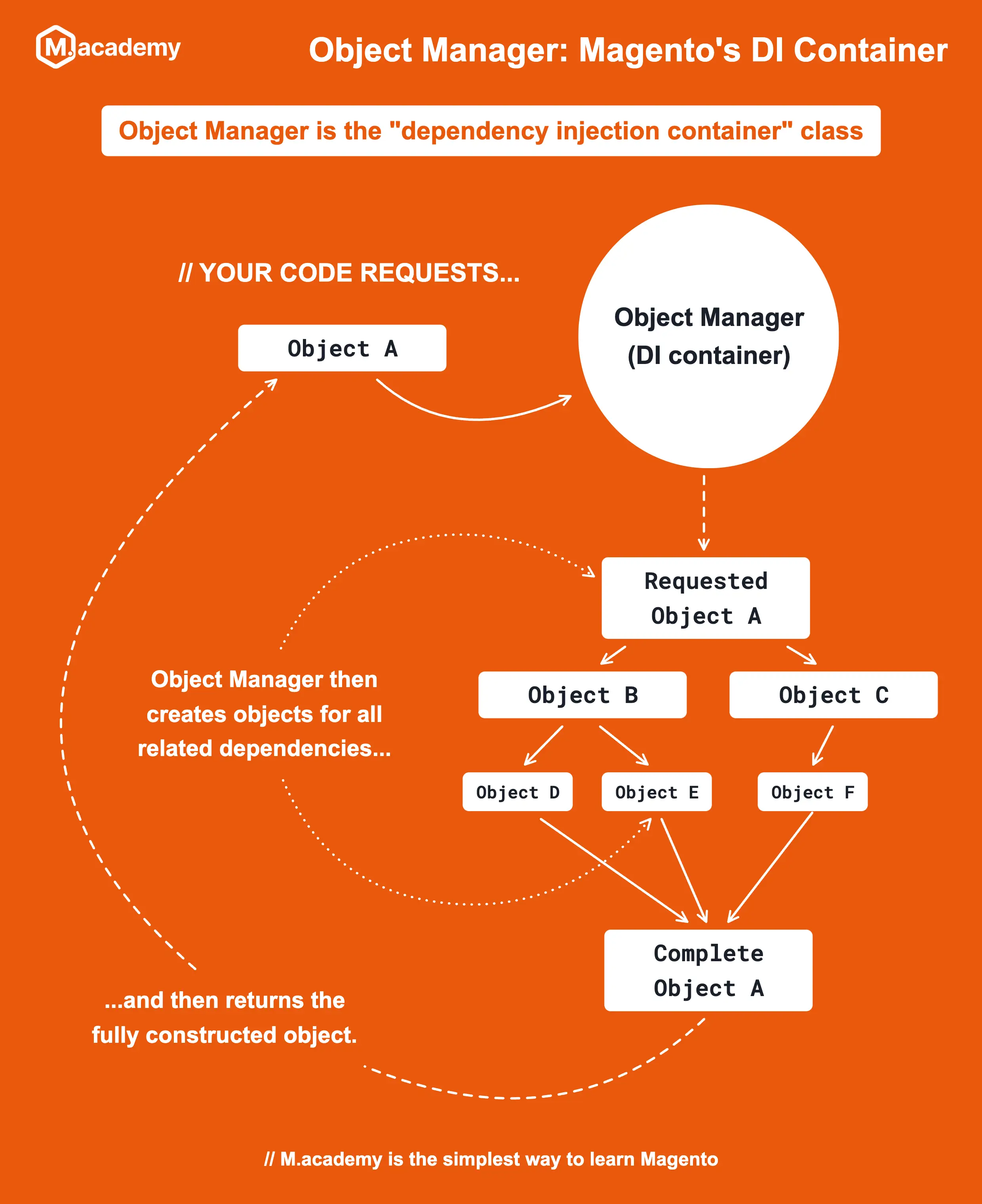
The Object Manager serves as Magento's dependency injection container. This is the central class responsible for managing the creation of objects in the framework.
In Magento you almost never write new. You list what a class needs in its constructor, and the Object Manager builds it, along with everything that class needs, and so on down the tree. Not only does it create objects, but it also manages the dependencies between them. When you request an object from the Object Manager, it will automatically create all other objects that the requested object depends on.
Why not just use new?
It's very easy to create an object with plain PHP: use the new keyword. So let's try it on something common, like the customer session. This is a throwaway controller, just to dump the object to the screen:
<?php
declare(strict_types=1);
namespace Macademy\Blog\Controller\Post;
use Magento\Customer\Model\Session;
use Magento\Framework\App\Action\HttpGetActionInterface;
class Detail implements HttpGetActionInterface
{
public function execute()
{
echo '<pre>';
var_dump(new Session());
die();
}
}Refresh the page and you get this instead:
ArgumentCountError: Too few arguments to function Magento\Customer\Model\Session::__construct(), 0 passed in /var/www/html/app/code/Macademy/Blog/Controller/Post/Detail.php on line 15 and at least 21 expected in /var/www/html/vendor/magento/module-customer/Model/Session.php:142The Session constructor in 2.4.9 takes 23 arguments, and 21 of them are required. Some of those are interfaces, so you'd also need to know which concrete class di.xml maps each one to. And each of those classes has its own constructor arguments.
That's only half the problem, though. Even if you wired all of that up by hand, new skips everything Magento layers on top of a class: preferences, di.xml arguments and plugins. Another module's plugin on Session would silently never run for your object.
Creating Objects with Object Manager (The Wrong Way)
You could create objects directly with the Object Manager by writing code like this, and placing it anywhere in your Magento codebase:
// Get an instance of Object Manager
$objectManager = \Magento\Framework\App\ObjectManager::getInstance();
// Create an instance of a Product model
$product = $objectManager->create(\Magento\Catalog\Model\Product::class);This works! Unlike new, it even applies preferences, di.xml arguments and plugins, so if you test it, things look fine. But it also creates some serious problems.
What it bypasses is constructor injection. Your class's real dependencies are hidden inside method bodies instead of declared in the constructor, so nobody can see them, swap them, or replace them in a test. Adobe's Object Manager docs are blunt about it: "You do not call the object manager directly because the framework handles this automatically."
It also hurts you with the Adobe Commerce Marketplace. If you're planning to distribute your extension there, a static getInstance() call sprinkled through your code is exactly what a code review pushes back on.
And since the object is created inside your method, you can't hand your class a mock of it in a unit test. That makes the code both hard to debug and difficult to test.
Injecting the Object Manager (Still Not Great)
A somewhat better approach is to inject the Object Manager interface as a dependency in your class constructor, and then use it to create the objects you need:
<?php
declare(strict_types=1);
namespace Vendor\Module\Service;
use Magento\Catalog\Model\Product;
use Magento\Framework\ObjectManagerInterface;
class Foo
{
public function __construct(
private ObjectManagerInterface $objectManager,
) {
}
public function someCode(): void
{
$product = $this->objectManager->create(Product::class);
}
}This avoids the static getInstance() call, so at least a test can pass in a fake Object Manager. It's still a bad idea.
This is the service locator pattern. The constructor says "I need an Object Manager", which is true of literally every class in Magento and tells the reader nothing. The class's real dependencies stay hidden behind a generic locator, so anyone reading your code has to dig through every method to find out what it actually uses.
There are specific reasons to use SOLID principles in object-oriented design, and this approach violates the "D" principle, which stands for Dependency Inversion Principle.
By injecting the Object Manager rather than the class you'd like to use, you're not delegating the responsibility of object creation to Magento's dependency injection system, which is the reason it exists. Adobe's docs say the same: classes should not ask for the ObjectManager itself as a constructor dependency.
Proper Dependency Injection (The Right Way)
The correct way to get objects in Magento 2 is to ask for them in your class constructor, rather than creating them dynamically.
There's one catch, and it's the one that bites people: services get injected; entities come from factories or repositories. A product, a customer or an order is an entity. You don't inject one directly. You inject the thing that loads or creates it:
<?php
declare(strict_types=1);
namespace Vendor\Module\Service;
use Magento\Catalog\Api\Data\ProductInterface;
use Magento\Catalog\Api\ProductRepositoryInterface;
use Magento\Catalog\Model\ProductFactory;
class Foo
{
public function __construct(
private ProductRepositoryInterface $productRepository,
private ProductFactory $productFactory,
) {
}
public function getProduct(string $sku): ProductInterface
{
// Load an existing product
return $this->productRepository->get($sku);
}
public function newProduct(): ProductInterface
{
// Create a brand-new, empty product
return $this->productFactory->create();
}
}The dependencies are explicit, and Magento manages how they're created. ProductRepositoryInterface is mapped to a concrete repository by a preference in Magento_Catalog's di.xml, and ProductFactory doesn't even exist as a file in core. Magento generates it for you the first time it's needed (or during bin/magento setup:di:compile).
Why not inject Product directly?
Because of shared instances. By default, the Object Manager hands out one shared instance per class: every class that asks for Magento\Customer\Model\Session in its constructor gets the exact same object for that request. That's exactly what you want for a service like the session, a logger or a repository.
It's what you don't want for an entity. Inject Product into two different classes and they both get the same empty product. Set data on it in one class and the other one sees it. That's a nasty bug to track down.
This is often called a "singleton", but it isn't the Singleton design pattern. There's no private constructor and no static getInstance() on the class. The container just reuses the object it already built. If you want a fresh object every time, either use a factory ($this->productFactory->create() always returns a new one), or mark the type as non-shared in di.xml:
<?xml version="1.0"?>
<config xmlns:xsi="http://www.w3.org/2001/XMLSchema-instance" xsi:noNamespaceSchemaLocation="urn:magento:framework:ObjectManager/etc/config.xsd">
<type name="Vendor\Module\Model\SomeStatefulThing" shared="false"/>
</config>You can also set shared="false" on a single xsi:type="object" argument, so only that one injection gets its own copy.
Shorter constructors with property promotion
All of the examples above use PHP 8's constructor property promotion. You'll still see the older style in plenty of existing code, including a lot of core:
private Session $session;
public function __construct(
Session $session
) {
$this->session = $session;
}That repeats $session three times. With promotion, the private keyword in the parameter list declares and assigns the property in one go:
public function __construct(
private Session $session,
) {
}Both produce the exact same result. No new, no Object Manager, one line in the constructor.
Dependencies of Dependencies
One of the most powerful aspects of Magento's dependency injection system is that it can manage dependencies of dependencies. This means that if you inject a class that has its own dependencies, Magento will automatically create those dependencies as well.
The Product objects the factory and repository hand back actually have their own dependencies (and a ridiculous number of them, at that). Let's look at the Product constructor in 2.4.9:
public function __construct(
\Magento\Framework\Model\Context $context,
\Magento\Framework\Registry $registry,
\Magento\Framework\Api\ExtensionAttributesFactory $extensionFactory,
AttributeValueFactory $customAttributeFactory,
\Magento\Store\Model\StoreManagerInterface $storeManager,
\Magento\Catalog\Api\ProductAttributeRepositoryInterface $metadataService,
Product\Url $url,
Product\Link $productLink,
\Magento\Catalog\Model\Product\Configuration\Item\OptionFactory $itemOptionFactory,
\Magento\CatalogInventory\Api\Data\StockItemInterfaceFactory $stockItemFactory,
\Magento\Catalog\Model\Product\OptionFactory $catalogProductOptionFactory,
\Magento\Catalog\Model\Product\Visibility $catalogProductVisibility,
Status $catalogProductStatus,
\Magento\Catalog\Model\Product\Media\Config $catalogProductMediaConfig,
Product\Type $catalogProductType,
\Magento\Framework\Module\Manager $moduleManager,
\Magento\Catalog\Helper\Product $catalogProduct,
\Magento\Catalog\Model\ResourceModel\Product $resource,
\Magento\Catalog\Model\ResourceModel\Product\Collection $resourceCollection,
\Magento\Framework\Data\CollectionFactory $collectionFactory,
\Magento\Framework\Filesystem $filesystem,
\Magento\Framework\Indexer\IndexerRegistry $indexerRegistry,
\Magento\Catalog\Model\Indexer\Product\Flat\Processor $productFlatIndexerProcessor,
\Magento\Catalog\Model\Indexer\Product\Price\Processor $productPriceIndexerProcessor,
\Magento\Catalog\Model\Indexer\Product\Eav\Processor $productEavIndexerProcessor,
CategoryRepositoryInterface $categoryRepository,
Product\Image\CacheFactory $imageCacheFactory,
\Magento\Catalog\Model\ProductLink\CollectionProvider $entityCollectionProvider,
\Magento\Catalog\Model\Product\LinkTypeProvider $linkTypeProvider,
\Magento\Catalog\Api\Data\ProductLinkInterfaceFactory $productLinkFactory,
\Magento\Catalog\Api\Data\ProductLinkExtensionFactory $productLinkExtensionFactory,
EntryConverterPool $mediaGalleryEntryConverterPool,
\Magento\Framework\Api\DataObjectHelper $dataObjectHelper,
\Magento\Framework\Api\ExtensionAttribute\JoinProcessorInterface $joinProcessor,
array $data = [],
?\Magento\Eav\Model\Config $config = null,
?FilterProductCustomAttribute $filterCustomAttribute = null
) {
// ...
}Holy moly -- that's a lot of dependencies! But since all of these dependencies are injected into the Product class, we don't need to worry about how they are created or managed. When the factory or repository creates a product, the Object Manager builds every one of these for us.
If you ever want to see exactly what the Object Manager will build for a class (its preference, constructor arguments and plugins), bin/magento dev:di:info prints it out.
Why Proper Dependency Injection Matters
A few more reasons to stay away from calling the Object Manager yourself:
-
Your code becomes more testable - You can easily mock dependencies for unit tests. For example, using PHPUnit, you can mock
ProductRepositoryInterfaceand pass it into your class during testing, ensuring you're testing your logic in isolation. While most developers don't write tests for their Magento code, it's still a good practice to follow because it makes your code easier to reason about. -
Magento builds objects efficiently - The Object Manager reuses shared instances where it can, and generates factories and proxies for you. Code that calls
create()all over the place ends up building new objects it didn't need. -
Your code remains compatible with all Magento environments. This includes production mode (often used with compilation for performance), deployments on platforms like Adobe Commerce Cloud, and code that adheres to Adobe Commerce Marketplace standards.
-
Your dependencies are explicit - Anyone reading your code can immediately see what other components your class depends on. This makes your code easier to understand and maintain, and also makes it easier for other developers to work with your code.
-
You follow Adobe's guidelines - Making your extensions far more likely to pass a code review. This is especially important if you're planning to distribute your extension on the Adobe Commerce Marketplace, but it's also critical for ensuring your code works with future versions of Magento.
When Direct Object Manager Usage is Acceptable
I always like to look at the inverse of a "rule" to understand when it's acceptable to break it. And indeed, there are a few cases where using the Object Manager directly is acceptable, while still being in line with Magento's best practices:
-
In factories - Where the class to be instantiated is determined at runtime. For example, a factory might use the Object Manager to create a specific product type based on a configuration value. For plain "give me a new X" factories, Magento generates the
*Factoryclass for you, so you almost never write one yourself. -
In proxies - Where lazy loading is implemented. Proxy classes are used to defer the creation of an object until it's actually needed, and they use the Object Manager internally. Magento generates these too; the Proxy classes course walks through when to reach for one.
-
For constructor backward compatibility - Core does this all the time when it adds a new constructor argument: the new argument is optional (
?AccountConfirmation $accountConfirmation = null), and the constructor falls back toObjectManager::getInstance()->get()when it's not passed. That keeps third-party classes that extend it from breaking. -
In bootstrap code or one-off scripts - Before the dependency injection system is fully initialized, or in rare cases like custom command-line scripts, where DI isn't practical. However, even in these cases, you should have a strong justification for why you are even writing one-off CLI scripts instead of creating them as standard executable CLI commands.
For almost everything else, proper dependency injection is the way to go.
Recap
While it might seem easier to grab the Object Manager and create objects directly, this approach creates an enormous amount of technical debt and introduces compatibility issues, both with the codebase and with future Magento updates. By using proper dependency injection, you create more maintainable, testable, and compatible Magento code.
Let the Object Manager build your objects. Just never call it yourself.
Once your objects come from DI, the next thing to understand is how other modules change them on the way in. Plugins vs. event observers is a good place to start.